
- Published on
Project: Agriness Presence App
- Authors

- Name
- Gustavo Kuze
- About
- About the author
Introduction
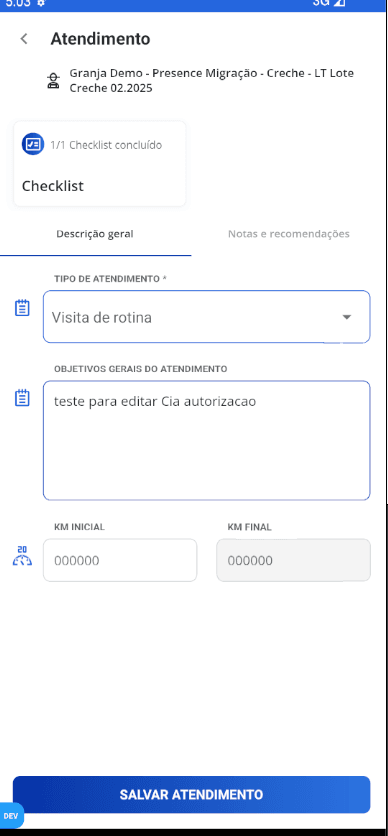
In 2022, I took the lead of the team responsible for the mobile side of the Presence App, an offline‑first React Native application that helps agricultural technicians from large corporations organize their daily work, generate reports, and track KPIs while servicing multiple farms. In this post I share the experience, challenges, and lessons learned throughout this journey.
Project context
The Presence App is not a simple data‑collection tool. It is part of the field‑operation workflow of large agribusinesses, where technicians spend their days moving between farms, checklists, indicators, sanitary records, scheduling visits and monitoring results. Most of the time connectivity is poor or non‑existent, so the technician cannot rely on the internet to do their job.
Because of that, the app needed to be reliable offline, tolerant of delayed synchronizations, resilient to inconsistencies and simple enough not to hinder the routine of people in the field solving real problems.
My role as technical lead
When I took over, my role quickly went beyond just writing features. I had to organise the team’s technical work, improve delivery quality, reduce regressions and, at the same time, keep the product evolving in a context with many business rules.
In short, my activities were:
- lead the mobile architecture of the project in React Native
- guide implementation decisions with a focus on stability and maintainability
- help the team translate business rules into code
- tackle performance, synchronization and reliability issues
- structure a development flow that allowed the app to evolve without becoming a bottleneck
It was a very hands‑on leadership style. I kept implementing critical parts of the system, but also spent a lot of energy unlocking the team, reviewing architectural decisions and preventing quick fixes from turning into recurring problems months later.
The real challenge: true offline‑first
Many people use “offline‑first” as a buzzword in presentations. In the Presence App it is an operational requirement.
The technician can record information throughout the whole day without a stable connection. Later, the app must synchronize everything without losing data, duplicating events or leaving the user unsure about what has been sent.
This brings a series of problems, such as:
- a queue of pending operations
- synchronization status tracking
- conflict handling
- reliable local persistence
- clear UI feedback for actions that are still unsynced
A large part of the most valuable work in the project lives here. It’s not the kind of thing that shows up in a portfolio screenshot, but it’s what determines whether the product is usable.
Technical decisions that made a difference
Throughout the project we built on top of React Native with Expo in the bare workflow, Redux Toolkit, state persistence and a well‑separated service layer. This helps a lot, but also requires discipline. In apps with a lot of business logic, any slip in state organisation pays off later.
Some decisions were especially important:
Centralise state and async flows with Redux
With multiple domains co‑existing in the same app—attendance, calendars, batches, checklists, indicators and user preferences—it makes sense to keep state management predictable. Redux Toolkit reduces boilerplate, but the real gain comes from clear flow. It becomes easier to see who dispatches each action, how data is persisted and where synchronization can break.
Separate business logic from UI layer
This is a point I hit often. A screen must not become a dump for critical rules. Whenever logic is scattered across components, hooks and navigation callbacks, maintenance suffers and regression risk rises. As the project evolves we pushed more responsibilities into slices, services and predictable flows.
Careful data synchronization
Synchronization is the core of the Presence experience. We need to balance what must be shown to the user versus what can stay in the background. Concepts like “pending sync”, “synced” and “error” must exist both in code and in the UI. The user must understand what is happening without guessing.
Improve error and production behaviour collection
A big pain the team had when I joined was that many things happened to the technician without the team’s knowledge. Errors, strange behaviours, and nobody could explain why. The app already had Sentry and Amplitude, but they help mainly with code exceptions, not business‑rule failures.
Because of that, I introduced a file‑based logging system that stores information throughout the app usage. If a checklist is out of date yet still appears as available, the logs let us pinpoint why it happened. This sped up incident resolution by more than 90 %.
Leading also meant organising chaos
Long‑running projects normally accumulate layers: urgent feature, quick fix, workaround, a tiny screen that grows too big. The Presence App is no exception.
Part of my job is to identify where the foundation is getting fragile and address it without halting delivery. You can’t always stop everything and refactor perfectly. Almost never, in fact. So the strategy has to be pragmatic: improve the structure while the product keeps moving.
That involved decisions such as:
- refactor critical sections before they become bottlenecks
- standardise implementation patterns across modules
- raise the level of code reviews
- demand clearer types, contracts and responsibilities
- avoid pushing architectural problems indefinitely
Technical leadership, to me, is a lot of this. It’s not just choosing a stack or approving a PR. It’s creating an environment where the team can make good decisions more often.
The human side of the project
This type of product quickly teaches that software does not exist in a vacuum. What looks simple on paper is often confusing in real use. What seems like a good abstraction in code may not match the mental flow of a field technician.
Therefore, an important part of leadership is bridging technology and operation. Understanding the user’s context helps reduce artificial solutions. Instead of only asking “how to implement?”, the right question is often “how does this person work when the day deviates from the script?”.
That shift in perspective improves many things: the UI, error tolerance and even technical prioritisation.
What I take from this experience
Leading the Presence App reinforced several convictions as a senior React Native developer.
- Reliability outweighs visual polish when the app underpins field operations. If the user does not trust what has been saved, synced or sent, everything else loses value.
- Good architecture is not the prettiest. It is the one that helps the team evolve the product with less risk. In projects with heavy business logic, readability and predictability win over cleverness.
- True technical leadership requires context. Decisions cannot be made by looking at code alone. You need to understand the product, the operation, team constraints and long‑term impact.
Closing thoughts
I look at this project as one of the most complete works of my career so far. It demands technical repertoire, execution ability, product reading and maturity to lead decisions in a complex environment.
More than delivering features, the challenge is to build trust: the user’s trust in the app, the team’s trust in the codebase and the operation’s trust that the mobile solution can bear the weight of daily work.
It is this kind of problem that makes me grow as a technical leader, and honestly, it is the type of project I love to work on.